Google Analytics – Why Businesses Need GA4
Google Analytics 4 (GA4) is the newest version of web analytics. It replaces Universal Analytics as Google’s main tool for figuring out how well a website is doing and how users are using it. In today’s digital world, businesses can’t afford to skip GA4. It gives them the important information they need to make smart choices about marketing strategies, website optimisation, and how to connect with customers.
This full guide looks at why Google Analytics is a must-have for businesses today and gives you clear, step-by-step directions on how to set up GA4 on your website. If you’re new to web analytics or moving from an older platform, learning how to use GA4 and what it can do will help your business use data-driven insights to grow and get ahead of the competition.
Important Points
- GA4 is the most recent version of Google Analytics. It helps businesses see how customers act on multiple devices and platforms more clearly.
- It employs an event-based tracking system that looks at particular activities that users take instead of just page visits to provide you more information.
- GA4 helps companies learn more about their customers, figure out how well their marketing campaigns are working, and make choices based on data.
- To set up GA4, you need to make an account, set up a property, set up a data stream, and put the tracking code on your website.
- To receive accurate data and improve business performance, it’s important to set up GA4 correctly, which includes setting up conversion events and linking to other Google products.
What is Google Analytics 4 (GA4)?
If you’re new to making websites, you might not know much about Google Analytics 4, which most of us call GA4. This is the most recent version of Google’s advanced web analytics service. It’s not just a small change; it’s a big change in how we understand what’s going on with our apps and websites.
GA4 is based on events, not just page visits and sessions. This means that it records every activity a user takes, like clicking, scrolling, playing a video, or downloading something, as a separate event. This approach based on events lets you see how users act on multiple devices and platforms in much more detail. It is meant to let you see the whole customer experience more clearly, from the first click to the last conversion and beyond.
Why does this matter? Because the digital world is always changing. Users interact with businesses in many different ways, and GA4 is designed to handle that complexity. It uses machine learning to find trends and give you information that you might not have found otherwise. This helps you go beyond merely counting visits and really figure out how people interact with your business online.
Here’s a quick list of what GA4 can accomplish for you:
- Monitor metrics such as site views, scrolls, outbound clicks, and video engagement.
- Know how customers move from one website or app to another.
- Use predictive analytics to learn more about how users act.
- Combine data from different places to get a single view.
- GA4 is a step toward a more user- and privacy-focused way of collecting data. It gets organisations ready for a future with fewer third-party cookies. It’s all about getting the correct information to make better choices.
In short, GA4 is like a digital compass that helps you make smart decisions to grow your business by understanding how people behave online.

Why GA4 is Essential for Modern Businesses
Any digital marketing agency will tell you that it’s no longer a luxury to know your customers and how they interact with your brand online; it’s a must. Google Analytics 4 (GA4) gives you the ability to do this by letting you track how users move throughout different websites and apps in a more advanced way. This platform aims to provide you with unparalleled insights into your audience.
Understanding Your Audience Like Never Before
GA4 goes beyond just counting page views and instead looks at events, or the specific things people do. This lets you see anything from a button click to a video play, so you can get a better idea of what really interests your visitors. You can observe how people travel about your site, what material keeps them interested, and where they might be having trouble.
- Event-Based Tracking: Monitor specific user interactions like form submissions, downloads, or video watches.
- Cross-Platform Insights: Get a unified view of user behaviour whether they’re on your website or using your app.
- Predictive Metrics: GA4 can forecast future user actions, helping you anticipate needs and tailor experiences.
By focusing on user actions rather than just sessions, GA4 helps you understand the ‘why’ behind user behaviour, not just the ‘what’.
How to Measure Marketing ROI and Campaign Success
Any firm needs to know which marketing initiatives are really working. GA4 lets you link your marketing spending directly to user actions and conversions. You may find out which initiatives are bringing in traffic, which channels are bringing in the most engaged users (SEO, ads, or something else), and, in the end, which activities are making you money.
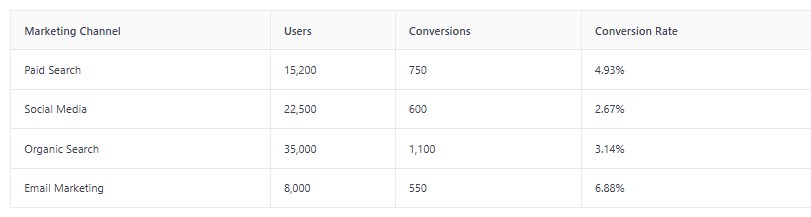
This kind of data helps you allocate your marketing budget more wisely, focusing on what works and refining or cutting what doesn’t.
Driving Business Growth Through Data-Driven Decisions
Ultimately, the goal of analytics is to inform better business decisions. GA4 provides the data you need to make informed choices about product development, user experience improvements, and marketing strategies. By understanding user behaviour and campaign performance, you can identify opportunities for growth and make adjustments that lead to increased engagement, more conversions, and greater overall success for your business.
How to Find Out If You Already Have GA4
It’s a beneficial idea to check if you already have a Google Analytics 4 (GA4) property before you start setting one up. Many websites, especially those upgraded in recent years, have likely already made the switch.
The easiest way to find out is to look at the source code of your website.
Here’s how to do that:
- Open your website in a web browser.
- Right-click anywhere on the page and select “View Page Source” or “Inspect Element” (the exact wording might vary slightly depending on your browser).
- Once the source code is displayed, use your browser’s find function (usually Ctrl+F on Windows or Cmd+F on Mac) to search for specific GA4 identifiers.
Look for the following:
gtag.js: This is the global site tag used by Google for analytics and advertising products. If you see this script, it’s a strong indicator that you have some form of Google tracking installed.G-followed by a string of characters: This is your GA4 Measurement ID. It will look something likeG-XXXXXXXXXX. If you find this string within thegtag.jscode, you definitely have GA4 set up.analytics.js: This is the older tracking code for Universal Analytics. If you only find this, you have the previous version of Google Analytics, not GA4.
If you find a G- Measurement ID, congratulations! You likely already have GA4 running. Your next step would be to verify its configuration and ensure it’s collecting data correctly, which we’ll cover later.
If you don’t find any Google Analytics tracking code, or only find the older analytics.js code, then you’ll need to proceed with setting up a new GA4 property.
How to Make a GA4 Account
Setting up Google Analytics 4 (GA4) is easy, but you need to pay attention to the details to make sure you get the appropriate data from the outset. Think of it as laying the groundwork for all the marketing knowledge you’ll get in the future.
First, you need to sign up for a Google Analytics account. Go to the Google Analytics website and sign in with your Google account if you don’t already have one. You will be asked to start measuring. You can make a new account and call it anything that clearly shows what your business is, like “Your Business Name Analytics.” You may also change the settings for sharing data here. Take a close look at these settings because they affect how your data works with Google’s services.
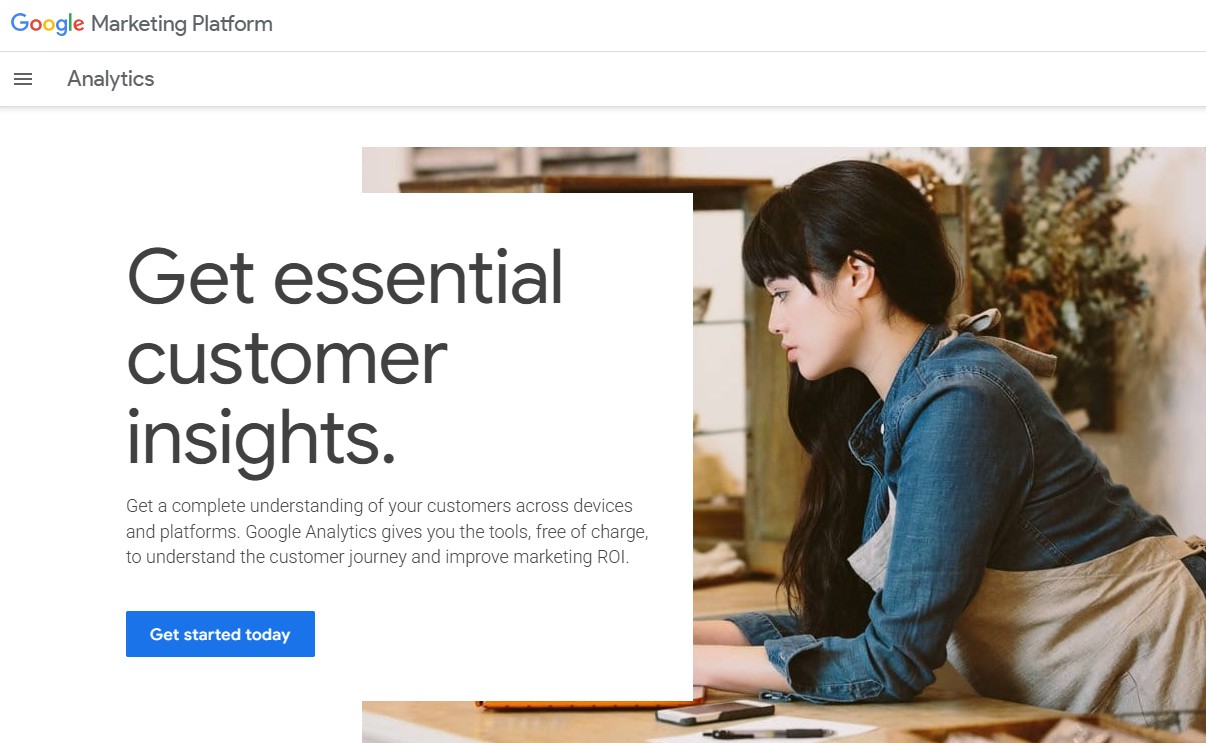
Next, you need to set up the property. A property is basically the place where GA4 will store all the information it gathers about your app or website. You should give your property a name, like “YourSite.com GA4,” which is the domain name of your website. You will also need to pick your currency and reporting time zone. This is very important for correct reporting, especially if you do business in more than one area or sell goods in more than one currency. After you click “Next,” you’ll need to give Google Analytics some basic information about your firm, such as its size and industry, and how you plan to utilise it. Your property is set up as soon as you click “Create” and agree to the terms of service.
The next important step is to build up a data stream. This is the real source that GA4 will use to get information. You will choose the platform, which will most likely be “Web” for a website. Next, type in the URL of your website and give the stream a name that describes it. GA4 has “enhanced measurement” features that can keep track of things like scrolls, clicks to leave, and file downloads on their own. It’s usually a good idea to turn these on for better data, unless you have a solid reason not to. Then Google will give you a Measurement ID that is unique to you. This ID usually starts with “G-.” This ID links your GA4 account to your website.
Here are the main steps in a nutshell:
- Create Your Account: Sign in to Google Analytics and create a new account with your business name.
- Set Up Your Property: Define a property for your website or app, including time zone and currency.
- Configure Your Data Stream: Choose your platform (Web, Android, iOS) and enter your website URL.
- Obtain Your Measurement ID: This unique ID links your site to GA4.
Remember, a well-configured GA4 setup is the bedrock of effective data analysis. Take the time to get it right from the beginning to avoid data discrepancies later on.
How to Put GA4 on Your Website
Setting up Google Analytics 4 (GA4) on your website is easy, but you need to pay close attention to the details. At this point, you connect your website to the GA4 platform, which starts gathering information about your visitors. This information is what all of the insights we’ve talked about are based on.
Check Your Installation
You should check to see if everything is operating as it should once you upload the GA4 tracking code or set up your site through a plugin. This phase of verification is very important to make sure you get accurate data from the start.
- Check the Realtime Report: Navigate to your GA4 property, then go to
Reports>Realtime. Open your website in a new browser tab or on your mobile device. You should see at least one active user appear in the Realtime report within a few minutes. - Use Tag Assistant: Google’s Tag Assistant is a browser extension that helps you troubleshoot the installation of tags on your website, including GA4. It provides a visual way to see if your GA4 tag is firing correctly.
- Review DebugView: Within your GA4 Admin settings, you can find
DebugView. This feature allows you to see events in real-time as they are sent from your website, providing detailed information about each event and its parameters. This is particularly useful for troubleshooting custom event tracking.
Essential Configuration After Installation
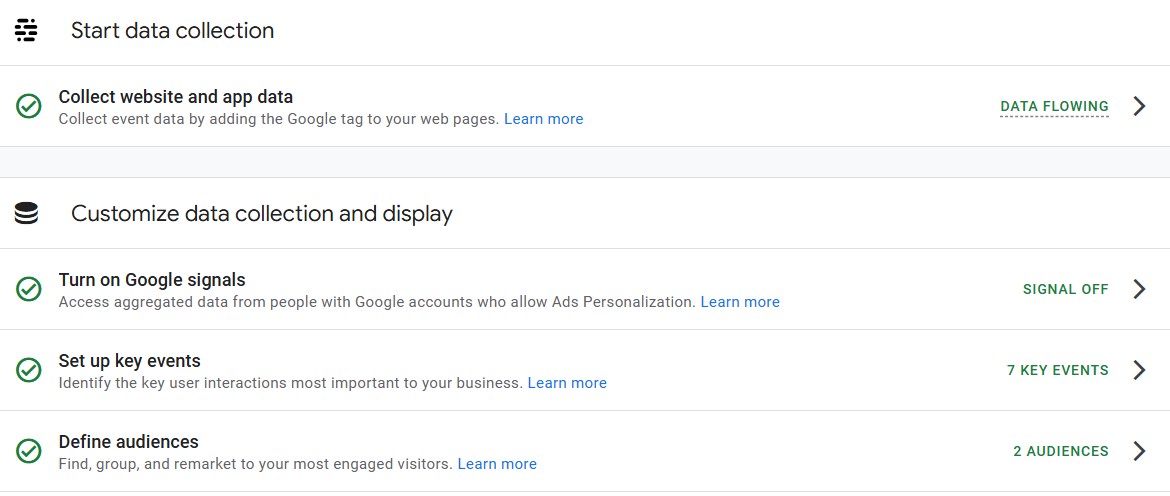
After confirming your GA4 installation is live, there are a few key configuration steps to take to maximise the value you get from the platform. These settings help tailor GA4 to your specific business needs and ensure you’re tracking what matters most.
- Define Your Conversions: In GA4, conversions are the actions that are most important for your business goals. These could be form submissions, purchases, or even specific button clicks. You’ll need to mark these events as conversions within the
Configuresection of GA4. This allows you to track how effectively your website is driving these key outcomes. - Set Up Custom Events: While GA4 automatically tracks many standard events (like page views and scrolls), you’ll likely want to track specific interactions unique to your website. This might include downloading a PDF, watching a video, or completing a specific step in a multi-page process. Properly configured custom events provide granular insights into user behaviour.
- Link to Other Google Products: Connecting GA4 with other Google services like Google Ads and Google Search Console is highly recommended. This integration allows for a more unified view of your marketing performance, enabling you to see how different channels contribute to your goals and optimise your advertising spend more effectively.
Properly embedding and configuring GA4 is not just about data collection; it’s about setting up a robust system for understanding your audience and measuring your business impact. Taking the time to verify your installation and complete these essential configurations will pay dividends in the quality of insights you can derive.
Final thought: Use GA4 to make your business successful.
Now you know what Google Analytics 4 can accomplish. It’s not just another analytics tool; it changes the way you think about your clients and how well your business does online. You should now see why switching to GA4 is so vital for remaining ahead of the competition.
GA4 gives you a better overall picture of the customer journey across all devices and platforms. This means you’re not just looking at isolated website visits, but a more complete picture of how people interact with your brand. Knowing your customers’ origins, their site activity, and what leads to a sale or inquiry gives you a big edge.
Here are some simple reasons why GA4 is a must:
- Deeper Audience Insights: Go beyond basic demographics to understand user behaviour and engagement patterns.
- Smarter Marketing: Measure the real impact of your campaigns and see which efforts are actually bringing in results.
- Growth Through Data: Make informed decisions that steer your business in the right direction, rather than guessing.
Getting GA4 set up and configured correctly is the first step. Don’t let common mistakes trip you up. For instance, failing to set up custom conversion events means you won’t know what’s truly driving success. Similarly, not filtering out your own team’s website visits can skew your data, leading to flawed conclusions.
The world of technology moves quickly. Using old analytics is like attempting to find your way with an old map; you’ll get lost. You can make wise choices with the most up-to-date and accurate information that GA4 gives you.
It might seem like a lot of work to make the switch, but the benefits are huge. You’ll be better prepared to deal with changing client behaviours, get the most out of your marketing budget, and, in the end, build your business in a way that lasts. With the information GA4 gives you, it’s time to move forward with confidence.
Wrapping Up: Your Next Steps with GA4
Now you know how Google Analytics 4 can help your business a lot. It’s not enough to just keep track of numbers anymore. You need to know what users are doing on your site and how to make their experience better. It might seem like a lot of work to switch, but the information you’ll acquire is worth it. You can start by looking at the reports, setting up a few important events, and seeing what the data says. It’s okay if you’re feeling a little overwhelmed. There are a lot of resources and specialists who can help you get the most out of GA4. Don’t fall behind; start utilising GA4 to make better choices for your organisation right now.
Share this article
A quick overview of the topics covered in this article.
Latest articles

October 11, 2026

October 11, 2026