
The Google Ads Scheduling Mistake That’s Quietly Wasting Your Budget
Even $25 dollars a day disappears faster than you’d think when Google has eleven hours to spend it. Not because the clicks are expensive — sometimes they’re not — but because the algorithm doesn’t know your best customers stopped searching at 4pm.
Ad scheduling is one of those settings that looks fine on the surface. Campaign’s running, budget’s spending, the dashboard shows activity. What it doesn’t show is where that activity is happening and whether those clicks were ever going to turn into anything.
Why More Hours Usually Means Worse Results
Google’s standard delivery paces your budget across whatever window you’ve set. Give it a seven-hour window and it spreads $25 over seven hours. Give it eleven hours and it spreads the same $25 over eleven, which means less spend during the hours that actually matter.
The algorithm isn’t psychic. It doesn’t front-load your budget into your highest-converting hours. It paces. So if your customers are searching — and buying — between 9am and 4pm, but your Google Ads are running until 8pm, you’re essentially siphoning budget away from your peak window and handing it to evening searchers who probably weren’t going to convert anyway.
The Evening Hours Aren’t Free — They’re Expensive in a Different Way
Low-cost clicks in low-intent hours still cost money. Someone browsing at 7:30pm on their phone, half-watching TV, clicking an ad out of mild curiosity — that click might cost you $2. Doesn’t sound like much until you realise that $2 could have gone toward someone actively looking to buy at 10am.

Honestly? This is where a lot of small budgets quietly haemorrhage. Not in one obvious place. Just a few dollars a day, slowly, in hours that were never going to work.
What Google Actually Does When You Extend the Window
There’s a common assumption that Google will naturally figure out your best hours and prioritise them. To some extent, Smart Bidding does this — it factors in signals like time of day when adjusting bids. But it still has to operate within your schedule, and it still has to pace spend across that window.
If you extend your hours hoping the algorithm will concentrate spend in the morning, you’re relying on a system that was designed to distribute, not concentrate. The result is usually a flatter spend curve than you wanted, with more impressions in the evening and fewer in the window where they count.
How to Actually Control Where Your Budget Goes
The right move isn’t extending hours – it’s tightening them, and using bid adjustments to reinforce the hours you want.
A few practical options:
- Set your schedule to your proven conversion window — in this case, 9am to 4pm. Don’t leave the campaign running on hope
- Use ad scheduling bid adjustments to decrease bids outside that window rather than turning hours off entirely, which gives you some flexibility without diluting your peak
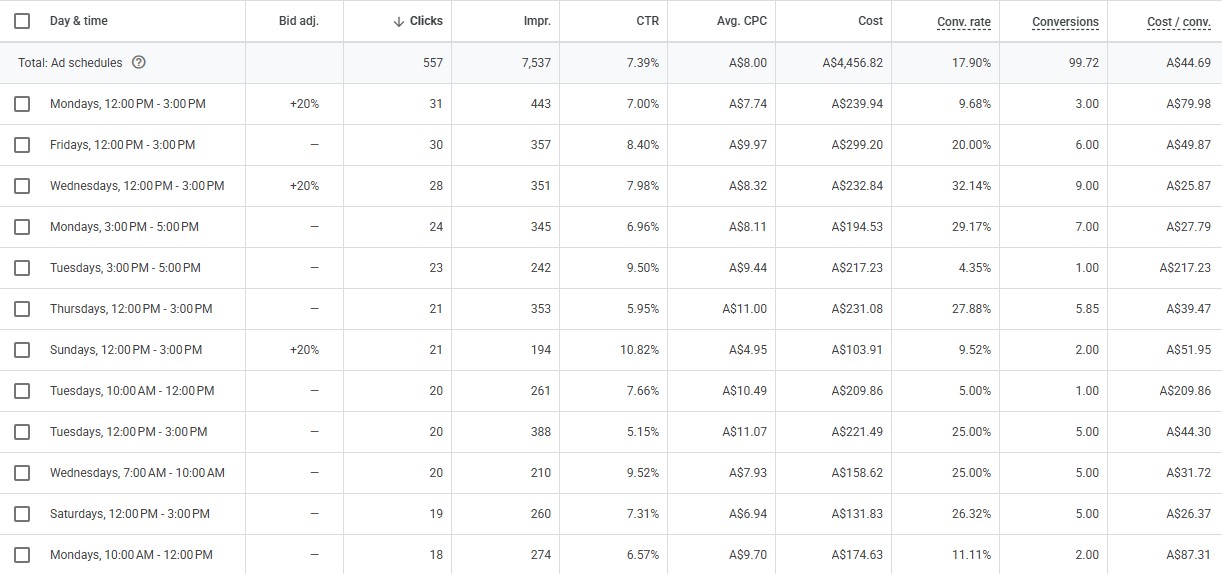
- Check your Hour of Day report under Dimensions. If you’ve been running broader hours, you might find your cost-per-conversion after 5pm is two or three times higher than during the day. That’s the number that tells the real story
- If budget isn’t fully spending within your peak window, the fix is usually Quality Score or match type, not a longer schedule
When Budget Doesn’t Fully Spend
If $25 isn’t being used up before 4pm, extending hours is the wrong diagnosis. Low spend within a good window usually points to something else — search volume is lower than expected, bids are too conservative, or the keywords are too narrow. Adding hours to solve an underspend problem is like leaving a shop open later to fix slow lunchtime sales.
The budget will spend eventually if you give Google enough time. That’s not the goal. The goal is spending it on the right people.
Share this article
Latest articles

October 11, 2026

October 11, 2026