How To Improve Your Website Load Time
In today’s fast-paced digital landscape, the speed at which your website loads is no longer a minor detail; it’s a significant factor influencing both your search engine rankings and the overall experience for your visitors. If you’ve even noticed your website seems to take forever to load, you’re not alone. This is a common problem, especially with sites that have a lot of moving parts. We’re going to look at how you can improve your website load times so visitors not only stick around, but engage with your content.
Key Takeaways
- Make sure your images aren’t massive files; smaller images load faster.
- Using browser caching means repeat visitors won’t have to wait as long.
- Combining and shrinking your code files (CSS, JavaScript, HTML) helps a heap.
- A faster server response time means the site starts loading quicker.
- Using a CDN can speed things up by serving content from locations closer to your visitors.
Why Website Load Time Matters for SEO and User Experience
A slow website can actively harm your business. Users have very little patience; research indicates that most will abandon a site if it takes longer than a few seconds to become interactive. This directly impacts your bounce rate, conversion rates, and ultimately, your bottom line.
Any reputable SEO company will tell you if you’re site loads too slowly, your rankings will suffer!
Key Factors Affecting Website Load Speed
Several elements contribute to how quickly your pages appear to users. Understanding these is the first step towards improvement:
- Image Optimisation: Large, uncompressed image files are a common culprit for slow loading times. Using the correct file formats (like JPEG for photos and PNG for graphics) and ensuring images are appropriately sized for different devices is vital.
- Browser Caching: This technique allows browsers to store parts of your website locally, so returning visitors don’t have to re-download everything. It significantly speeds up subsequent visits.
- Minifying CSS, JavaScript, and HTML: Removing unnecessary characters and code from these files can reduce their size, leading to faster downloads and quicker rendering by the browser.
- Reducing Server Response Time: This refers to how quickly your server sends the first byte of data to the browser. Optimising server logic, database queries, and even upgrading hardware can make a difference.
- Leveraging a Content Delivery Network (CDN): A CDN distributes your website’s content across multiple servers globally. This means users can download files from a server geographically closer to them, reducing latency.
- Optimising Font Loading: Web fonts, while improving design, can also slow down loading if not handled correctly. Techniques like font subsetting or using system fonts can help.
- Eliminating Render-Blocking Resources: These are scripts or stylesheets that must be downloaded and processed before the browser can display the page content. Deferring or asynchronously loading them is key.
Slow loading times directly translate to lost opportunities. Every second of delay can mean a potential customer clicking away to a competitor’s site, impacting your brand’s reputation and your ability to achieve business goals.
When your website performs well, you’ll see a positive ripple effect: lower bounce rates, higher engagement, improved search engine visibility, and ultimately, a better return on your digital investment. It’s about respecting your visitors’ time and providing them with a smooth, efficient experience.
Addressing Your Website Load Speed Issues
When you’re looking to speed up your website, it’s not just about making things look pretty; it’s about making them work efficiently. A web design company can usually assist with this and really should do as part of your build. Several key elements can significantly impact how quickly your pages load for visitors. Understanding these factors is the first step towards a faster, more user-friendly online presence.
Image Optimisation
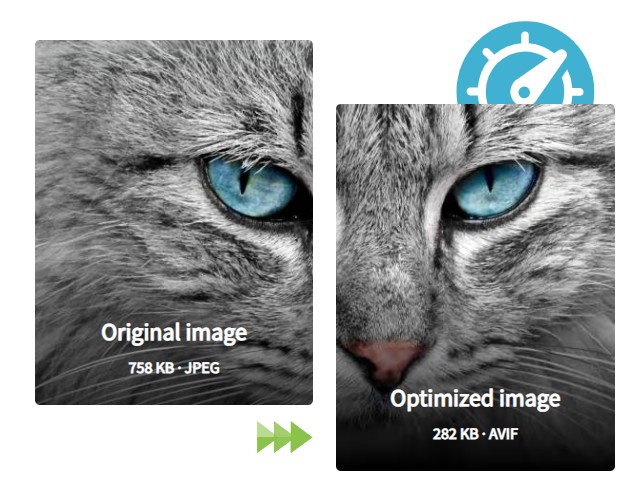
Images are often the biggest culprits when it comes to slow load times. Large, uncompressed image files can drastically increase the time it takes for a page to render. It’s important to use the right file formats – JPEGs are generally best for photographs with many colours, while PNGs are better for graphics with fewer colours or transparency. You also need to consider image dimensions; don’t upload an image that’s 2000 pixels wide if it’s only going to be displayed at 500 pixels. Using responsive images, which allow the browser to select the most appropriate image size based on the user’s screen, is also a smart move. Think of it like this: you wouldn’t send a billboard-sized photo to someone just to have them look at it on their phone, would you?
Browser Caching
Browser caching is like giving your website a short-term memory. When a visitor lands on your site, their browser downloads various files – images, stylesheets, scripts. If caching is enabled, the browser stores copies of these files locally. The next time that visitor returns, or visits another page on your site, their browser can pull these files from its local cache instead of downloading them all over again from your server. This dramatically speeds up subsequent page loads. It’s a simple yet powerful way to improve the experience for returning visitors.
Minifying CSS, JavaScript, and HTML
When developers write code, they often include extra characters like spaces, comments, and line breaks to make it more readable. While this is great for humans, computers don’t need all that extra clutter. Minification is the process of removing these unnecessary characters from your code files without changing how the code functions. This results in smaller file sizes, which means they can be downloaded and processed by the browser much faster. It’s like tidying up your code so it’s lean and efficient.
Reducing Server Response Time
This refers to how quickly your server sends the first byte of data back to the browser after a request is made. A slow server response time, often called Time to First Byte (TTFB), can be caused by a number of things. These include inefficient server-side code, slow database queries, or simply an underpowered hosting plan. Optimising your server’s application logic, improving database performance, or even upgrading your hosting can all help to bring this time down. A faster server response means the browser can start building the page sooner.
Leveraging a Content Delivery Network (CDN)
A Content Delivery Network (CDN) is a network of servers distributed geographically. When you use a CDN, copies of your website’s static files (like images, CSS, and JavaScript) are stored on these servers around the world. When a visitor accesses your site, the CDN delivers these files from the server that is geographically closest to them. This significantly reduces the distance the data has to travel, leading to faster load times, especially for visitors who are far from your main web server. Read all the benefits of a CDN.

Optimising Font Loading
Web fonts can add a lot of personality to your website, but they can also slow things down if not handled correctly. Fonts are essentially files that need to be downloaded by the browser. If you’re loading too many different font styles or weights, or if the font files themselves are large, it can delay the display of text on your page. Techniques like preloading fonts, using modern font formats (like WOFF2), and only loading the specific font weights and styles you actually use can make a big difference.
Eliminating Render-Blocking Resources
Render-blocking resources are files, typically JavaScript and CSS, that the browser must download and process before it can start displaying the content of your web page. If these files are placed in a way that forces the browser to stop and wait, it can create a noticeable delay in what the user sees. By deferring the loading of non-critical JavaScript until after the page has rendered, or by inlining critical CSS needed for above-the-fold content, you can allow the browser to display your page much more quickly.
Tools to Test and Analyse Your Website Speed
Before you start tweaking your website’s code or fiddling with server settings, you need to know where you stand. Think of it like getting a health check-up; you wouldn’t start a new fitness regime without knowing your current stats, right? The same applies to your website’s speed. You need reliable data to see what’s actually slowing things down and to measure the impact of any changes you make.
Understanding Your Website’s Performance Metrics
When we talk about website speed, it’s not just about one number. Google, for instance, focuses on what they call Core Web Vitals. These are specific metrics that aim to measure the user experience directly. The main ones you’ll want to keep an eye on are:
- Largest Contentful Paint (LCP): This measures when the largest content element on your page (like an image or a block of text) becomes visible.
- First Input Delay (FID): This measures the time from when a user first interacts with your page (like clicking a button) to the time when the browser is actually able to begin processing that interaction.
- Cumulative Layout Shift (CLS): This measures unexpected shifts in the layout of the page content as it loads. You know, those annoying times when you’re about to click something, and then it suddenly moves?
Getting these numbers right is pretty important for both your visitors and your search engine rankings.
Essential Tools for Speed Analysis
Fortunately, you don’t need to be a tech wizard to get this information. There are some excellent tools available that make analysing your website speed straightforward. These tools provide the insights you need to identify bottlenecks and prioritise your optimisation efforts.
Here are a few top picks:
- Google PageSpeed Insights: This is a fantastic starting point. It analyses your page’s content and provides a performance score for both mobile and desktop versions. It also gives specific recommendations on how to improve, often linking directly to the relevant areas in your site.
- GTmetrix: GTmetrix offers a more detailed breakdown of your site’s performance, including load time, page size, and the number of requests. It also provides waterfall charts, which visually show you how each element on your page loads, making it easier to spot slow-loading resources.
- WebPageTest: For a really in-depth analysis, WebPageTest is brilliant. You can test your site from various locations around the world, using different browsers and connection speeds. This gives you a realistic view of how your site performs for a global audience.
- Pingdom Tools: Similar to GTmetrix, Pingdom Tools provides performance grades, load times, and detailed reports. It’s another solid option for understanding your site’s speed.
Using these tools regularly will give you a clear picture of your website’s health and guide you on the most effective ways to speed it up. It’s all about making informed decisions based on real data.
Monitoring and Maintaining Website Speed
Once you’ve implemented changes to boost your website’s speed, the job isn’t done. Think of it like maintaining a car; regular check-ups are key to keeping it running smoothly. Continuous monitoring ensures that your efforts pay off and that no new issues creep in to slow things down.
Regular Performance Audits
It’s wise to schedule regular checks of your website’s speed. This doesn’t need to be daily, but perhaps weekly or bi-weekly, depending on how often you update your site. These audits help you catch any performance regressions early.
Monitor Core Web Vitals
Keep a close eye on Google’s Core Web Vitals: Largest Contentful Paint (LCP), First Input Delay (FID), and Cumulative Layout Shift (CLS). These metrics directly impact user experience and SEO. Aim to keep LCP under 2.5 seconds, FID under 100 milliseconds, and CLS under 0.1. Regularly checking these will give you a clear picture of how your site is performing in real-world conditions.
Analyse User Behaviour
Beyond technical metrics, observe how users interact with your site. Are they bouncing quickly from certain pages? This could indicate a speed issue or a usability problem. Tools that track user journeys can provide insights into where visitors might be getting frustrated due to slow loading times. Crazy Egg is a great tool to use.
 NOT the Crazy Egg software!
Stay Updated with Tools and Technologies
The digital landscape changes rapidly. New browser features, updated algorithms, and evolving best practices for web performance emerge regularly. Make it a habit to explore new tools or techniques that could further optimise your site’s speed. For instance, advancements in image compression or new JavaScript bundling methods might offer further improvements.
Wrapping Up Your Website Speed Journey
So, you’ve gone through the steps to make your website faster. It’s not always a walk in the park, and sometimes things don’t go as planned, but getting your site to load quickly is a big deal for your visitors and your business. Remember, this isn’t a one-off job. Keep an eye on how your site is performing, make changes, and then check again. If you’re looking for a hand with all this, tools like Sematext Cloud can really help you see what’s going on and make things better. Give it a go – you might be surprised at the difference it makes.
Frequently Asked Questions
Why is it important for my website to load quickly?
Think of website speed like a shop. If it takes too long for the doors to open or for someone to serve you, you might go somewhere else. For your website, if it loads slowly, visitors might leave before they even see what you offer. This means you could lose customers or readers. Search engines also notice this, and slower sites might not rank as highly.
What usually makes a website load slowly?
Several things can make your website slow. Big images that aren’t made smaller, too many fancy scripts or code that isn’t organised neatly, and your website’s ‘home’ (the server) not being very fast are common culprits. Not using special ‘cache’ features that save bits of your site for repeat visitors also slows things down.
How can I find out if my website is slow and what’s causing it?
You can use online tools, like Google’s PageSpeed Insights or GTmetrix, to check how fast your website is. These tools will tell you exactly what’s slowing it down, such as large images or unoptimised code, and often suggest how to fix it.
What are some simple ways to make my website load faster?
You can make your website faster by making your image files smaller without losing quality, organising your code better, and using ‘browser caching’ so repeat visitors load your site quicker. Also, making sure your server is speedy and using a service called a CDN (Content Delivery Network) can help a lot.
Does website speed matter for mobile phones too?
Yes, it’s crucial! Many people browse the internet on their phones. Websites often need extra work to load just as fast on a mobile device as they do on a computer. You should always check your site’s speed on both computers and phones.
Should I keep checking my website’s speed after I’ve made improvements?
It’s a good idea to check your website’s speed regularly. Think of it like servicing your car. By keeping an eye on it and making small adjustments now and then, you ensure it always runs smoothly. This helps you catch any new problems before they significantly affect your visitors or your search engine rankings.
Share this article
A quick overview of the topics covered in this article.
Latest articles

October 11, 2026

October 11, 2026