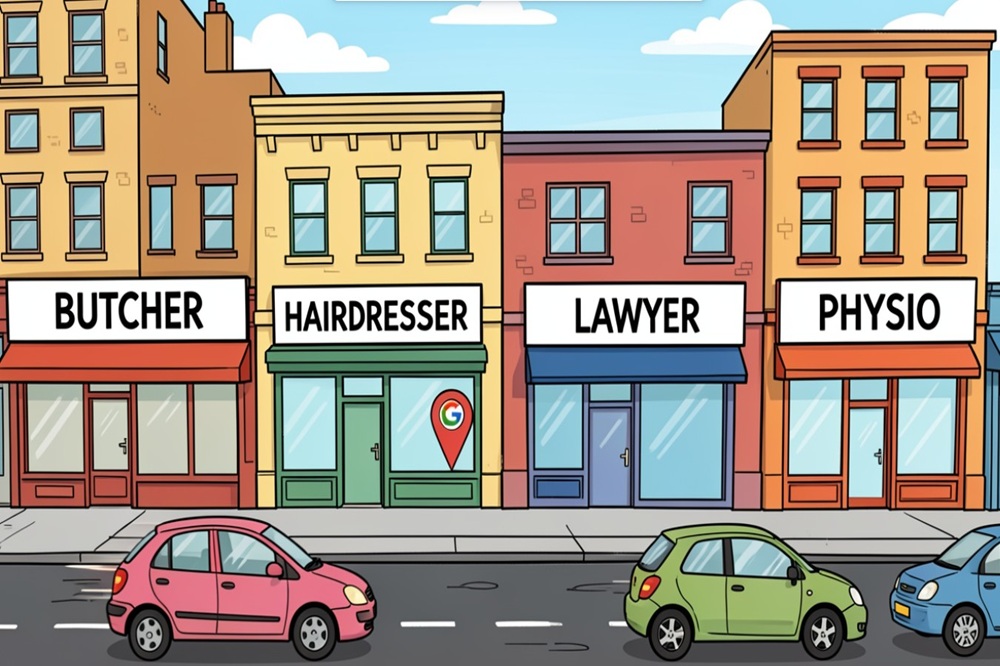
Can businesses still rank well in Google maps without listing a physical location
You might be wondering if it’s possible to get your business seen on Google Maps without having a physical shopfront. It’s a common question, especially for businesses that travel to their customers, like plumbers or cleaners. The good news is, yes, you absolutely can rank well in Google Maps, even if you don’t have a public address listed. It just takes a bit of know-how to set things up correctly and focus on what Google actually looks for.
Important Points
- You can rank in Google Maps as a service-area business without displaying a physical address, provided your Google Business Profile and website are set up correctly.
- Focus on accurately defining your service areas, choosing the most relevant primary category, and building authority through quality content and customer reviews.
- Relevance, distance to the customer, and prominence (how well-known your business is) are the main factors Google considers for local rankings, not just having a physical address.
- Building legitimate third-party citations and encouraging customer reviews are vital for trust and visibility, especially when your address isn’t public.
- Always follow Google’s guidelines, avoid fake addresses or duplicate listings, and prioritise your safety and privacy when deciding how much information to share online.
Understanding Service Area Businesses And Google Maps
Defining A Service Area Business
Many businesses operate differently to a traditional shopfront. Instead of customers coming to you, you travel to them. Think plumbers, electricians, cleaners, or even mobile mechanics. These are known as Service Area Businesses (SABs). Google understands this model and allows you to operate and rank without displaying your home or office address publicly. The key is setting up your Google Business Profile correctly to reflect this operational style. You don’t need a physical shopfront to appear in local search results.
The Distinction Between Shopfronts and Field Operations
It’s important to know the difference between a business where customers visit a fixed location and one where you visit the customer. A traditional shopfront business, like a cafe or a retail store, has a public address that customers can find and visit. Google expects this address to be visible. On the other hand, a service area business performs its work at the client’s location. This means your business address might not be relevant for customers to find, and in many cases, you’ll want to keep it private for security or privacy reasons. Google accommodates this by allowing you to hide your address and define the specific areas you serve.
Google’s Stance On Address Visibility
Google’s guidelines are quite clear on this: if your business travels to customers, you can hide your physical address. This is a significant advantage for many trades and service providers. However, simply hiding the address isn’t enough. You need to actively tell Google which areas you serve. This is done by defining your service areas within your Google Business Profile. Choosing these areas thoughtfully is more important than listing every possible location. Google wants to see that you genuinely serve the areas you claim, and this is supported by other signals like your website content and customer reviews from those regions.
Here’s a quick look at how Google views these business types:

It’s a common misconception that a physical address is a non-negotiable requirement for local search rankings. For service-area businesses, this simply isn’t the case if you configure your profile correctly and focus on the signals Google actually values for field-based operations.
Optimising Your Google Business Profile Without A Physical Address
Setting up your Google Business Profile when you don’t have a traditional shopfront is entirely achievable. In fact, for many businesses that operate on the go, it’s the standard approach. The key is understanding how Google views businesses that serve customers at their locations rather than at a fixed business address. If you need help, our local SEO services have got you covered.
Setting Up As A Service Area Business Correctly
When you first create or edit your Google Business Profile, you’ll be asked if you want to add a location that customers can visit. For businesses without a physical shopfront, the answer here is a definitive ‘no’. This action signals to Google that you are a Service Area Business (SAB). Once you’ve indicated this, you’ll be prompted to define the specific areas you serve. This is a critical step in ensuring your profile is correctly categorised and visible to the right local customers.
Strategic Service Area Selection
Choosing your service areas wisely is more than just ticking boxes. Think about where your customers are and where you can realistically provide your services efficiently. Start with your primary service city and then expand to surrounding suburbs or towns. It’s generally recommended to keep your defined service areas within a reasonable radius, often around 20 miles, to maintain relevance and manage logistical expectations. Overly broad service areas can dilute your local search visibility.
The Importance Of Primary Category Selection
Your primary category on your Google Business Profile is arguably the most important piece of information after your business name. It tells Google what your business does. If you’re a plumber, selecting ‘Plumber’ as your primary category is far more effective than a generic term like ‘Service’. Take your time to research and select the category that most accurately reflects your core services. This directly impacts which searches your profile will appear for.
- Accuracy is key: Choose the most specific category available.
- Relevance matters: Align the category with customer search terms.
- Don’t overcomplicate: Stick to one primary category that best fits.
Google’s algorithm prioritises businesses that clearly match user search intent. A well-chosen primary category is your first step in demonstrating that match.
Key Ranking Factors For Service Area Businesses
When you’re operating as a service-area business, meaning you travel to your clients rather than having them visit a physical shop, Google still has clear expectations for how you’ll rank. It’s not about having a fancy office; it’s about demonstrating your relevance, proximity, and authority. Let’s break down what truly matters.
Relevance: Matching Search Intent
Google’s primary goal is to provide users with the most accurate and helpful results for their searches. For service-area businesses, this means your Google Business Profile (GBP) and website need to clearly communicate what you do and who you serve. If someone searches for ’emergency plumber Sydney,’ Google wants to show plumbers who actually operate in Sydney and offer emergency services.
- Ensure your primary category on your GBP is spot on. This is the single most important way to tell Google what your business is about. Don’t pick a broad category if a more specific one fits better.
- Detail your services thoroughly. List every specific service you offer. Instead of just ‘cleaning,’ specify ‘end-of-lease cleaning,’ ‘office cleaning,’ or ‘window cleaning.’ Mentioning the types of clients you serve (e.g., ‘for strata managers’) also helps.
- Use keywords naturally throughout your website content. Think about the terms your potential customers would use when searching for your services.
Google prioritises businesses that clearly align with what a user is searching for. If your profile and website are vague, you’re unlikely to be seen as relevant.
Distance: Proximity To The Customer
While you might not have a physical shopfront, Google still considers proximity. For service-area businesses, this translates to the areas you serve. Google wants to connect users with businesses that can reach them efficiently.
- Define your service areas accurately. Don’t just blanket-select every suburb within a 100 km radius if you only realistically serve a specific region. Focus on the areas where you actively conduct business.
- Consider creating location-specific pages on your website. If you serve multiple distinct areas, having pages that detail your services for each specific suburb or town can signal to Google that you are a local provider for those locations.
- Encourage reviews that mention specific service locations. When customers mention the suburb or area where you performed a service, it reinforces your local presence.
Prominence: Building Authority And Trust
Prominence is about how well-known and respected your business is. This is built over time through various signals, and it’s particularly important for service-area businesses where a physical address isn’t a visible trust signal.
- Gather genuine customer reviews. Reviews are a massive trust signal. Aim for a consistent stream of positive reviews on your Google Business Profile. Encourage customers to leave detailed reviews mentioning the services performed.
- Build legitimate third-party citations. These are mentions of your business name, address (if applicable, or just name and phone number if you’re hiding your address), and website on other online directories and platforms. Consistency across these listings is key.
- Earn backlinks from reputable local websites. If other local businesses or community sites link to your website, it signals authority and local relevance.

By focusing on these three core factors, you can build a strong online presence and improve your visibility in local search results, even without a public-facing physical address.
Leveraging Website Content For Local Visibility
Although your Google Business Profile (GBP) is a powerful tool, it doesn’t function in isolation. Your website intrinsically links to your GBP, and this connection significantly influences Google’s perception of your local relevance. Think of your website as the detailed narrative that supports the concise summary of your GBP. If you’re a service area business without a physical shopfront, your website becomes even more critical for demonstrating your local presence and authority.
Creating Location-Specific Website Pages
Simply having a website isn’t enough; it needs to speak directly to the areas you serve. For service area businesses, this means creating dedicated pages for the key towns, suburbs, or regions you operate within. These aren’t just generic pages; they should be tailored to the specific needs and characteristics of each location.
- Detail Services Offered in Each Area: Clearly outline the services you provide in that specific location. For example, if you offer plumbing services, a page for ‘Plumbing Services in Parramatta’ should detail common issues faced by residents or businesses in Parramatta and how you can help.
- Incorporate Local Landmarks and References: Mentioning local landmarks, specific street names, or even local events can signal to both users and Google that you have a genuine connection to the area.
- Use Location-Specific Keywords: Naturally weave in keywords that people in that area would use when searching for your services. This includes the suburb name, nearby towns, and relevant local terms.
The Role Of Informational Content
Beyond just listing services, your website should act as a resource for potential customers in your service areas. Informational content demonstrates your knowledge and builds trust, which are key ranking signals.
- Blog Posts Addressing Local Needs: Write articles that answer common questions or solve problems relevant to your target locations. For instance, a landscaper might write about ‘Best Drought-Resistant Plants for Sydney’s Western Suburbs’.
- Case Studies or Testimonials from Specific Areas: Showcase successful projects or satisfied clients from particular locations. This provides social proof and reinforces your local presence.
- Guides and How-Tos: Create content that educates your audience about your industry, subtly positioning your business as the go-to expert in their area.
Ensuring Website Clarity And Optimisation
Even the most detailed content won’t help if your website is difficult to use or understand. Clarity and technical optimisations are paramount.
A well-structured, fast-loading website that clearly communicates who you are, what you do, and where you operate is fundamental for service area businesses. It supports your Google Business Profile and builds confidence with potential customers.
- Clear Contact Information: While you might hide your physical address on your GBP, your website should still make it easy for customers to contact you. Include a phone number, email address, and a contact form.
- Mobile-Friendliness: A significant portion of local searches happen on mobile devices. Your website must be responsive and function flawlessly on all screen sizes.
- Fast Loading Speeds: Users and Google alike prefer websites that load quickly. Optimise images, minimise code, and consider a good hosting provider to improve performance.
The Critical Role Of Reviews And Citations
Why Reviews Are Paramount For Service Area Businesses
For businesses that don’t have a physical storefront, customer reviews on your Google Business Profile (GBP) become incredibly important. Consider them as a combination of your digital presence and word-of-mouth recommendation. When potential customers search for services you offer, they’re looking for proof that you’re reliable and good at what you do. Positive reviews act as social proof, building trust and confidence even before they contact you. Google itself uses reviews as a significant signal for ranking, especially for businesses without a visible address. The more genuine, positive feedback you accumulate, the more likely Google is to show your business to people searching in your service areas.
Building Legitimate Third-Party Citations
In addition to Google, it is crucial for your business to maintain consistent listings across various online directories and platforms. These are known as citations. Think of sites like Yelp, Yellow Pages, or industry-specific directories. Having your business name, address (if applicable, or service area), and phone number (NAP) listed accurately and consistently across these sites helps Google verify your business’s existence and legitimacy. For service area businesses, the focus shifts slightly. Although these platforms may not display a physical address, it is crucial to ensure the accuracy of your service area and contact details. This consistency signals to Google that your business is real and active in the areas you claim to serve.
Balancing Privacy With Online Listings
It’s completely understandable to be concerned about privacy when listing your business online, especially if you operate from home. The good news is that you don’t necessarily need to display your private address publicly to gain visibility. The strategy involves carefully selecting which platforms display your address and which ones only list your service areas. Many important directories allow you to list as a service area business without showing a physical address. The goal is to be present and accurate at the most influential third-party sites that Google trusts, while still protecting your personal information. This often means prioritising platforms that allow service area listings and ensuring your website clearly defines the areas you cover.
Here’s a look at how citations can impact your visibility:
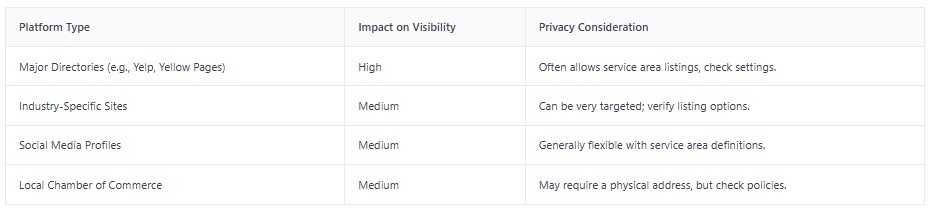
The key is to be listed where it counts for Google and for customers, without compromising your personal safety or privacy. Focus on accuracy and consistency across the platforms that matter most for your service area.
Navigating Verification And Avoiding Pitfalls
Legitimate Verification Methods For Address-Free Businesses
Even when you’ve set up your Google Business Profile as a service area business and opted to hide your physical address, Google still needs to confirm you’re a legitimate operation. This verification step is standard practice to prevent fraudulent listings. Fortunately, there are several reliable ways to achieve this without exposing your home address to the public.
- Phone Verification: Google may offer to call your business phone number. You’ll receive an automated call with a verification code to enter into your Google Business Profile dashboard. This is a quick and common method.
- Email Verification: In some cases, Google might send a verification code directly to the email address associated with your Google account or a business email address you provide. Pay close attention to both your inbox and spam folder.
- Home Address (Private): You can use your home address for verification, but rest assured, this address will not be displayed to customers on your public Google listing. It’s solely for Google’s internal confirmation that you are a real business operating from a verifiable location. This is often the most straightforward option if you work from home.
Understanding What Google Considers A Fake Address
Google is quite strict about the addresses used for verification. Using the incorrect address type can result in the suspension of your listing, which is a significant setback. It’s important to know what to avoid:
- PO Boxes: These are strictly prohibited for service area businesses. Google needs a physical location where business is conducted, and a PO Box doesn’t meet this requirement.
- Virtual Offices (without genuine business activity): While a virtual office might seem like a good workaround, Google requires that you can actually meet clients or conduct business operations at that address. If it’s just a mail drop and you can’t meet customers there, it’s not acceptable.
- Mail Forwarding Services: Similar to PO Boxes, these are not considered legitimate business addresses for verification purposes.
- Fictitious Addresses: Creating an address that doesn’t exist or isn’t associated with your actual business operations is a direct violation and will likely result in suspension.
Consequences Of Violating Google’s Guidelines
Sticking to Google’s guidelines is paramount for maintaining a healthy Google Business Profile. Ignoring them can have serious repercussions that impact your visibility and business operations.
- Listing Suspension: The most common consequence is having your Google Business Profile suspended. This means your business will disappear from Google Search and Maps results, effectively making you invisible to potential customers searching locally.
- Re-verification Challenges: If your listing is suspended, getting it reinstated can be a difficult and time-consuming process. You may need to provide extensive documentation to prove your business’s legitimacy.
- Ranking Penalties: Even if not outright suspended, repeatedly violating guidelines or attempting to use deceptive practices can lead to a drop in your search rankings, making it harder to be found.
- Loss of Trust: If customers encounter issues or find that your listing information is inaccurate due to guideline violations, it can erode trust in your brand.
For most home-based businesses, the primary goal is to serve customers effectively without compromising personal safety or privacy. Google’s verification process, while sometimes a point of confusion, is designed to ensure legitimacy. By understanding the acceptable verification methods and strictly avoiding prohibited address types, you can successfully navigate this stage and maintain a strong, compliant presence in local search results.
Advanced Strategies For Enhanced Local Reach
Utilising Hierarchy In Service Area Definitions
When you’re operating as a Service Area Business (SAB), defining your service areas thoughtfully is key. Instead of just picking a few major cities, consider a hierarchical approach. Start broad, perhaps with your entire state or a large county. Then, drill down into specific major cities within that region, followed by smaller towns and even specific zip codes. This layered definition helps Google understand the breadth and depth of your service coverage more effectively. It paints a clearer picture of your operational reach, which can positively influence your visibility.
The Synergy Between Google Business Profile And Website
Your Google Business Profile (GBP) and your website aren’t separate entities; they work together. Think of your GBP as the storefront window and your website as the detailed catalogue inside. Ensure your website clearly states the services you provide and the specific areas you serve. Creating dedicated location pages on your website for key service areas can be incredibly powerful. For instance, if you’re a plumber, having pages like ‘Plumber in [City Name]’ or ‘Drain Cleaning Services [Suburb Name]’ can send strong signals to Google about your local relevance. These pages should include local keywords, details about services offered in that specific area, and ideally, testimonials from customers in those locations. This reinforces your proximity to potential customers.
Integrating AI Optimisation With Traditional SEO
While traditional SEO practices remain vital, incorporating AI-driven tools can offer a competitive edge. AI can help analyse vast amounts of search data to identify emerging trends, understand user intent more deeply, and even predict keyword performance. For SABs, this means refining your service area definitions based on real-time demand, optimising your website content for nuanced search queries, and understanding which local factors are most impactful in specific regions. AI can help you move beyond guesswork and make data-backed decisions for your local SEO strategy. It’s about using technology to complement your efforts in building authority and trust, ensuring your business appears when and where potential customers are looking.
For Service Area Businesses, the goal is to demonstrate relevance and proximity to the customer, even without a physical storefront. A well-structured approach to defining service areas, optimising your website with location-specific content, and using advanced tools can significantly improve your local search rankings.
So, Can You Rank Without a Physical Address?
Look, the short answer is yes, you absolutely can still get your business seen on Google Maps even if you don’t have a physical shopfront. It turns out, Google is pretty flexible about this, especially for businesses that travel to their customers. The real trick isn’t having a fancy office; it’s about doing things the right way. Make sure your Google Business Profile is set up as a service-area business, keep that address private if you need to, and focus on what Google actually cares about: being relevant, being nearby, and being known. Reviews, good content on your website, and accurate listings elsewhere online are your best mates here. Don’t get caught up in old advice about needing an office – focus on serving your customers well and optimising your profile correctly, and you’ll be well on your way to appearing right where potential clients are looking.
Frequently Asked Questions
Can your business still show up on Google Maps if you don’t have a shop or office address?
Absolutely! If your business travels to customers, like a plumber or a cleaner, you can set it up as a ‘service area business’ on Google. This means you can hide your home address and still appear in search results. The key is to set up your Google Business Profile correctly and make sure your website clearly shows the areas you serve.
How many areas should you tell Google you service?
It’s best to be realistic. Focus on the main areas where you actually do business. Listing too many places might not be as helpful as listing the ones you can genuinely serve. Google cares more about quality and relevance than just a long list of locations.
Do you need a separate webpage for every single town you service?
Not necessarily. You should only create special pages on your website for towns where you can offer really useful, unique information or show you provide a strong service. It’s better to have a few great pages than lots of weak ones.
Is it okay to use a virtual office address for your Google listing?
No, it’s generally not a good idea. Google can often tell if an address isn’t a real place where you operate, and using fake addresses can lead to your listing being suspended or cause trust problems down the track.
Are customer reviews more important for businesses without a physical address?
Yes, they are very important. Since customers can’t visit your shop, reviews become a big way for Google to see that your business is trusted and well-regarded. Good reviews help build confidence and can boost your ranking.
How can your business get verified by Google if you don’t want to show your address?
Google has a few ways to verify businesses that don’t have a public address. Often, they can verify you through a phone call or an email. Sometimes, they might ask for an address just for verification purposes, but this address won’t be shown to the public if you’re set up as a service area business.
Share this article
A quick overview of the topics covered in this article.