Why Local Schema Markup is one of the Smartest SEO Moves a Small Business Can Make
There’s a lot of noise in the world of SEO. Algorithms change, ranking factors shift, and every few months a new tactic emerges promising to revolutionise a business’s online presence. But every now and then, something comes along that’s quietly powerful, genuinely underutilised, and worth talking about. Local schema markup is exactly that thing — and if a business’s website doesn’t have it, it’s leaving real opportunity on the table.
So What Actually Is Schema Markup?
Think of schema markup as a translator between a website and Google. A website might say all the right things in its content — the business name, the address, the phone number, the trading hours — but Google is reading hundreds of millions of pages and making educated guesses about what all of that information means.
Schema markup removes the guesswork entirely. It’s a small block of structured code added to the backend of a website that tells search engines, in plain and precise terms, exactly what a business is, where it operates, how to contact it, and when it’s open. No interpretation required. No guessing involved.
For local businesses – think trades, professional services, retail stores, medical and dental practices – this is enormously valuable.
What Does It Actually Do For a Business?
Adding local schema markup to a homepage and contact page delivers several meaningful advantages.
First, it strengthens local SEO. Google’s local ranking algorithm rewards businesses that provide clear, consistent, and structured signals about who they are and where they operate. Schema markup is one of the clearest signals a website can send. When it aligns with the information on a Google Business Profile, it reinforces credibility and can positively influence rankings in both the local map pack and organic results.
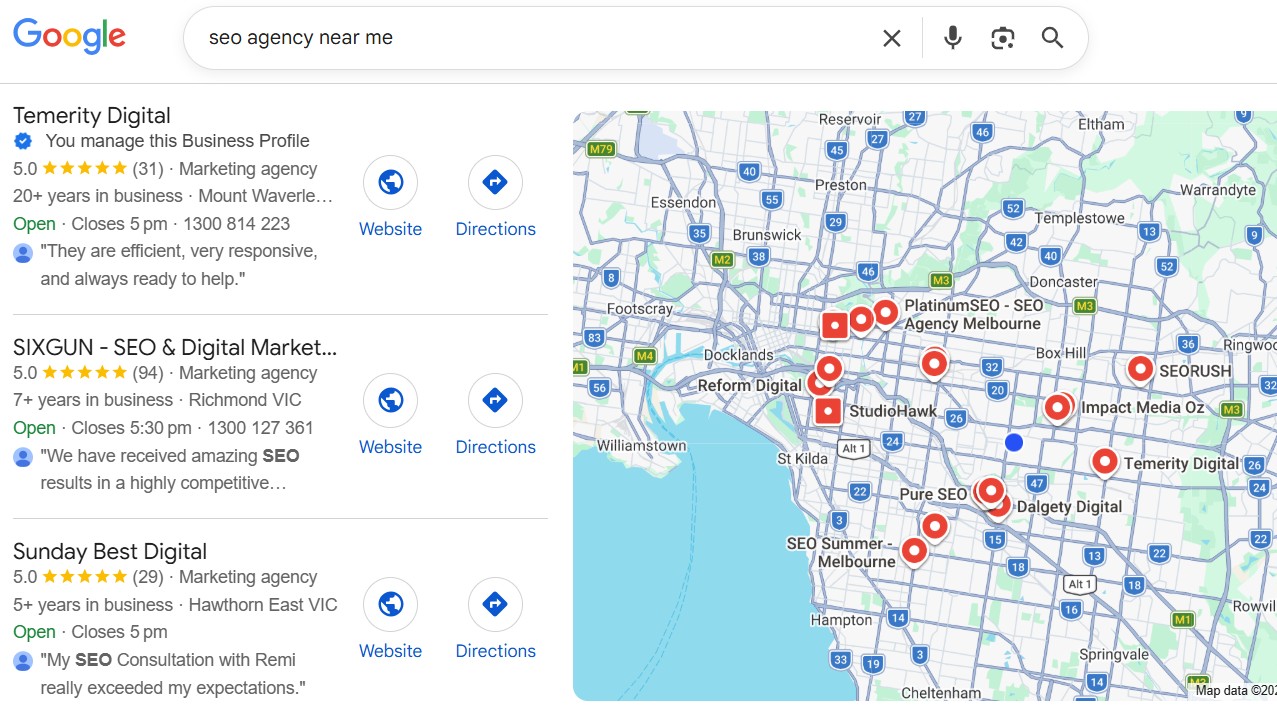
Second, it improves how a business appears in search results. Schema markup is the engine behind rich results — those enhanced listings in Google that display star ratings, opening hours, and contact details directly in the search results page. More visibility, more information upfront, and more reasons for a potential customer to click.
Third — and this is the one that’s only going to get more important — it makes a business more visible in AI-powered search. Google’s AI Overviews, ChatGPT’s browsing capabilities, and other AI search tools are increasingly pulling structured, verified data to answer queries directly. A business with properly implemented schema markup is giving those tools exactly what they need to confidently recommend it in an AI-generated response. A business without it? Much harder to surface.
{
  "@context": "https://schema.org",
  "@type": "LocalBusiness",
  "name": "Melbourne Home Services",
  "url": "https://www.melbournehomeservices.com.au",
  "telephone": "+61 3 9000 0000",
  "email": "hello@melbournehomeservices.com.au",
  "address": {
    "@type": "PostalAddress",
    "streetAddress": "123 Collins Street",
    "addressLocality": "Melbourne",
    "addressRegion": "VIC",
    "postalCode": "3000",
    "addressCountry": "AU"
  },
  "geo": {
    "@type": "GeoCoordinates",
    "latitude": -37.8136,
    "longitude": 144.9631
  },
  "openingHoursSpecification": [
    {
      "@type": "OpeningHoursSpecification",
      "dayOfWeek": ["Monday","Tuesday","Wednesday","Thursday","Friday"],
      "opens": "08:00",
      "closes": "17:00"
    },
    {
      "@type": "OpeningHoursSpecification",
      "dayOfWeek": "Saturday",
      "opens": "09:00",
      "closes": "13:00"
    }
  ],
  "areaServed": "Melbourne"
}
Where Should It Go?
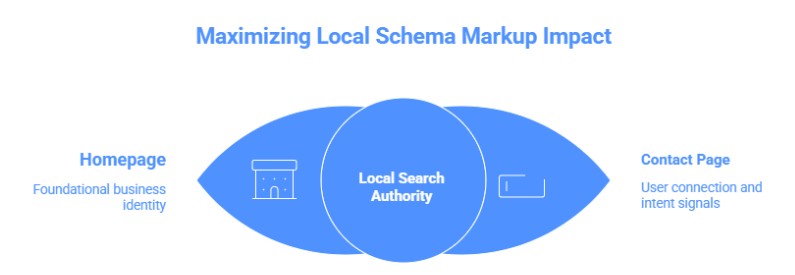
At a minimum, local schema markup should live on the homepage and the contact page. The homepage is where the foundational business identity signals belong — name, address, phone number, coordinates, trading hours, and service area. The contact page reinforces those details and signals to Google that this is where users come to connect with the business, which is exactly the kind of intent signal that matters in local search.
Schema on Services pages
If you’re a service-based business, having schema markup on your core services pages is also beneficial.
Richer SERP Appearance
Service pages with proper schema (especially Service, LocalBusiness, or FAQPage markup) can trigger enhanced snippets — FAQ dropdowns, review stars, pricing info — directly in the results. More real estate, better CTR, no extra ranking needed.
Stronger Topical Signals
Schema helps Google understand what the page is about with precision. For trade/professional niche pages (plumbers, lawyers, dentists etc.), explicitly marking up the service name, area served, and provider type reinforces your topical authority and geo-relevance — both of which matter a lot in local SEO.
Service-Specific Entity Clarity
Each service page can define its own Service entity, linked back to your LocalBusiness entity on the homepage. This builds a connected entity graph that makes it clearer to Google that you offer X, Y, Z distinct services — not just one vague thing.
Better Visibility in AI Overviews & SGE
Structured data is increasingly how Google’s AI-driven features pull confident, attributed answers. If your service pages are marked up cleanly, they’re better candidates to be cited in AI Overviews (AI SEO), especially for “who provides [service] in [city]” type queries.
FAQPage Schema = Free Extra Links
Adding FAQ schema to service pages (answering common client questions) can produce expandable accordion results in SERPs. That’s essentially bonus visibility — and for competitive niches like lawyers or dentists, those FAQ drops can push competitors below the fold.
Review/Rating Markup Where Relevant
If you’re pulling in reviews or testimonials on service pages, AggregateRating schema can surface stars in results — which is a significant trust signal that lifts CTR even when rankings stay flat.
Crawl Efficiency
Schema gives crawlers faster, more confident signals about page content. Not a massive factor, but on larger sites it contributes to how efficiently Googlebot interprets and indexes pages.
For businesses running WordPress, it can be implemented cleanly through a plugin like Code Snippets — no developer required, no theme files to touch, and no risk of it disappearing with the next update.
The Bottom Line
Schema markup isn’t glamorous. It doesn’t make a website look different, and clients can’t see it without digging into the code. But behind the scenes, it’s doing important work — giving Google and AI search tools the clearest possible picture of a business, and making sure that picture shows up in the right places at the right time.
In a competitive local market, that kind of clarity is worth a lot.
Share this article
A quick overview of the topics covered in this article.
Latest articles

October 7, 2026

October 7, 2026