Level Up Your Site with Google Search Console
If you own a website, you should really be using Google Search Console. It’s a free tool from Google that helps you see how your site is doing in Google Search. You can check out important performance data for your pages and keywords, figure out technical problems, and get a good look at your traffic. Honestly, think of Google Search Console as a way to see your website exactly how Google sees it. We’ll go through some of the best bits of Google Search Console to help you improve your website, get higher in search results, and understand who’s visiting your site.
Key Takeaways
- Google Search Console helps you see how your website performs in Google Search, giving you data on clicks, impressions, and your average ranking.
- You can use Google Search Console to find and fix technical issues that might be stopping your pages from showing up in search results.
- The tool lets you check which search terms people are using to find your site, helping you create or update content that matches what users are looking for.
- It’s important to verify your website ownership in Google Search Console to access all its features and make necessary changes.
- By submitting sitemaps and checking the index coverage report, you can help Google find and understand your website’s pages better.
What is Google Search Console?
Google Search Console is a free service from Google that helps you monitor, maintain, and troubleshoot your site’s presence in Google Search results. Think of it as your direct line to Google, providing insights into how your website is performing in search and what you can do to improve it.
It’s not just for technical wizards; it’s a tool that every website owner should be familiar with.
It gives you the data you need to understand your audience and optimise your content for better visibility.
It’s important to distinguish it from Google Analytics. While Analytics shows you what happens on your website – like user behaviour, traffic sources, and conversions – Search Console focuses on what happens before a user even clicks through to your site, specifically within Google Search.
It tells you how Google sees your site, which search terms people use to find you, and if there are any technical issues hindering your performance.

Why is Google Search Console Important for SEO?
If you’re serious about improving your website’s visibility in search results, then Google Search Console (GSC) is an indispensable tool. It’s not just about seeing how many people visit your site; it’s about understanding how Google sees your site and how you can make it more appealing to both search engines and users.
Think of GSC as your direct line to Google, offering insights that are otherwise hidden. Without it, you’re essentially guessing about your site’s performance and potential issues.
Understanding Your Website’s Performance
This is where you get a clear picture of how your site is showing up in Google Search. You can see metrics like:
- Clicks: The number of times users clicked on your website link in the search results.
- Impressions: How many times your website link appeared in search results.
- Average CTR (Click-Through Rate): The percentage of impressions that led to a click.
- Average Position: Your site’s average ranking for specific queries.
Identifying and Fixing Errors
Google Search Console flags technical issues that could be hindering your site’s performance. Most good SEO agencies will tell you a lot of technical issues don’t impact your SEO. And that’s true. However some technical issues can be disastrous! This includes problems with indexing (making sure Google can find and read your pages), mobile usability (how well your site works on phones), and crawl errors (when Googlebot can’t access a page).
Addressing these errors promptly can significantly improve your site’s health and its ability to rank well. For instance, if a page isn’t being indexed, it simply won’t appear in search results, no matter how good the content is.
Key areas to monitor for errors include:
- Index Coverage: Reports on which pages are indexed and any issues preventing indexing.
- Sitemaps: Submitting and checking the status of your sitemaps to help Google discover your content.
- Mobile Usability: Identifies pages with mobile-friendly issues.
- Core Web Vitals: Measures user experience based on loading speed, interactivity, and visual stability.
Addressing these promptly can significantly improve how Google ranks and displays your pages.
Improving User Experience
User experience is a major ranking factor, and GSC provides insights into how users interact with your site from a search perspective. By understanding which queries lead to clicks and which might be causing users to bounce (leave quickly), you can refine your content and site structure.
For example, if a particular keyword has a high number of impressions but a very low CTR, it might indicate that your page title or description isn’t compelling enough, or that the content doesn’t quite match the searcher’s intent.
Making your site easy to use and relevant to search queries directly impacts your rankings.
Understanding how users find your site and what they expect is key to creating content that satisfies their needs. This leads to better engagement and, ultimately, improved search performance.
Getting Started with Google Search Console
Getting your website set up with Google Search Console is a straightforward process, and it’s the first step to really understanding how your site performs in Google Search.
Verifying Your Website
Before you can see any data, you need to prove to Google that you own the website you’re trying to manage. This is a security measure to ensure only authorised individuals can access site-specific information.
You’ll need a Google account to begin – if you use Gmail or other Google services, you already have one.
When you first access Google Search Console, you’ll be prompted to add a property. You’ll see two main options: ‘Domain’ or ‘URL prefix’.
- Domain: This is the most flexible option, covering all versions of your site (like
www.example.com,blog.example.com, and bothhttpandhttpsversions) under one property. However, it requires verification through your domain’s DNS records, which might sound a bit technical, but it’s usually quite manageable if you have access to your domain registrar. - URL prefix: This method is simpler if you only have one specific version of your website (e.g.,
https://www.example.com). You can verify this by adding a meta tag to your site’s homepage, uploading an HTML file, or using existing Google services like Google Analytics or Google Tag Manager if they’re already set up on your site.
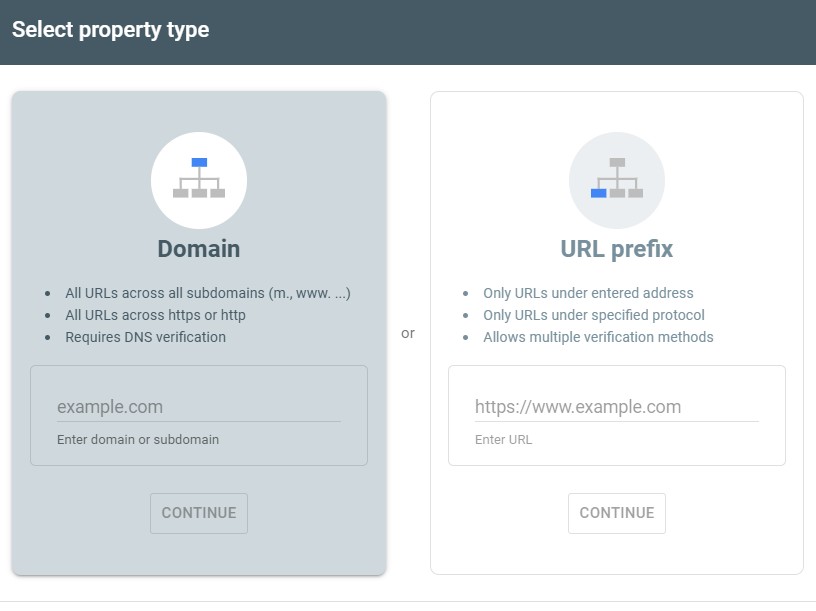
Choose the method that best suits your technical comfort level and website structure. The verification process is essential for unlocking all of Search Console’s capabilities.
Navigating the Dashboard
Once your website is verified, you’ll land on the main dashboard. Don’t be overwhelmed by all the options; it’s designed to give you a clear overview. On the left-hand side, you’ll find a menu that organises all the different reports and tools available.
Initially, some reports might show little to no data. This is normal, as Google needs time to crawl and index your site’s pages and gather performance metrics. Give it a few days, or even a week or two, and you’ll start seeing valuable information populate.
Key areas to familiarise yourself with early on include:
- Overview: This gives you a high-level summary of your site’s performance, index coverage, and any important messages or issues Google wants to alert you to. It’s a good place to start each time you log in.
- Performance: This is where you’ll spend a lot of your time. It details how your site is performing in Google Search, showing metrics like clicks, impressions, click-through rate (CTR), and average position for various queries and pages.
- Index Coverage: This report tells you how well your site is indexed by Google. It highlights any errors that might be preventing pages from appearing in search results.
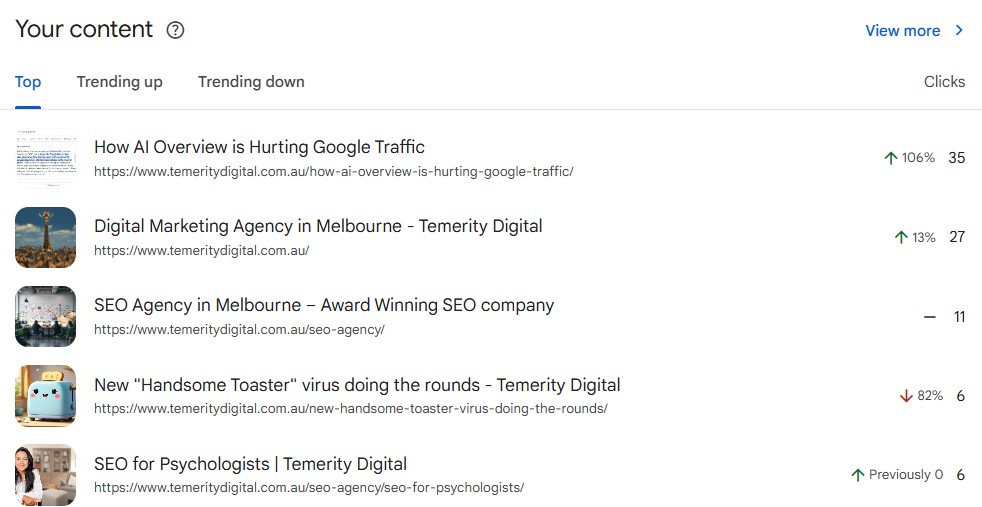
Take some time to click around and explore each section. The more familiar you become with the layout, the quicker you’ll be able to identify opportunities for improvement.
Key Features and Reports in Google Search Console
Once you’ve got your website verified, it’s time to explore what Google Search Console (GSC) can actually do for you. Think of GSC as your direct line to Google, offering insights into how your site performs in search results. It’s not just about vanity metrics; it’s about understanding user behaviour and technical health.
Performance Report
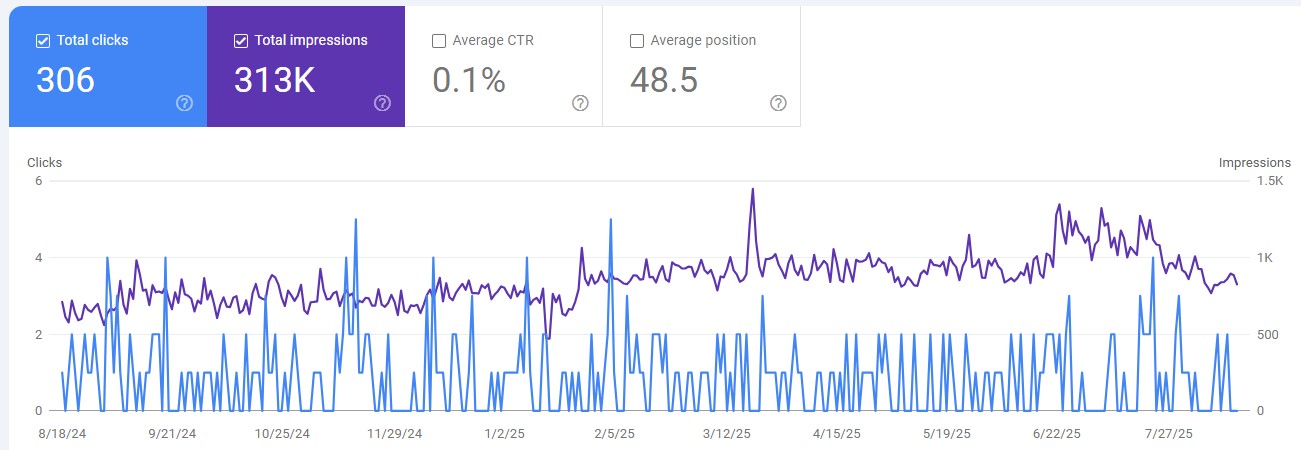
The Performance report is where you’ll spend a lot of your time. It breaks down how your website appears in Google Search and how users interact with it. You’ll see key metrics like:
- Clicks: The number of times users clicked on your website from a Google search result.
- Impressions: How many times your website appeared in search results.
- Average CTR (Click-Through Rate): The percentage of impressions that led to a click.
- Average Position: Your website’s average ranking for specific queries.
This report is invaluable for identifying which search queries drive traffic to your site, which pages are performing well, and where there might be opportunities to improve.
For instance, you can discover queries that your site ranks for (impressions) but doesn’t get many clicks on. This is a prime area to optimise your content to better match user intent. You can also see performance data broken down by country and device, helping you tailor your strategy.
Index Coverage Report
This report is your go-to for understanding how Google sees your website’s content. It tells you which pages are indexed, which are not, and why. Issues like ‘Crawled – currently not indexed’ or ‘Excluded by ‘noindex’ tag’ highlight pages that Google knows about but isn’t showing in search results.
It’s important to review this regularly. If a page has valuable content but isn’t indexed, you’ll want to investigate why. Sometimes, it’s as simple as a missing sitemap entry or a technical issue preventing Google from crawling it properly.
Understanding your index coverage helps ensure that all your important pages are discoverable by potential visitors.
Sitemaps
Submitting a sitemap to Google Search Console is like providing a roadmap for Google’s crawlers. It helps Google discover and understand the structure of your website, including all your important pages. You can submit your XML sitemap directly through GSC.
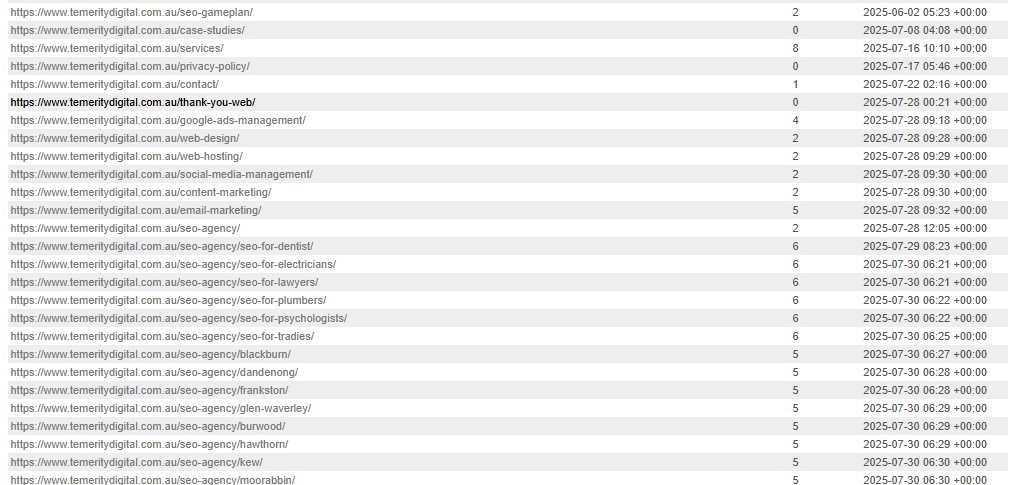
Once submitted, GSC will report on the status of your sitemap, letting you know if it was processed successfully and how many URLs were found. This is a straightforward yet powerful way to guide Google’s indexing process and make sure your latest content gets noticed.
Putting Google Search Console to Work for You
So, you’ve seen how Google Search Console can really help you understand how your website performs. It’s not just about seeing numbers; it’s about using that information to make your site better for visitors and for Google. By checking your performance reports, fixing any technical hiccups, and making sure your content is what people are actually searching for, you’re setting yourself up for better results.
Don’t feel like you need to be a tech wizard to use it. Start with the basics, check in regularly, and you’ll gradually get a feel for how it can guide your website’s growth. It’s a powerful free tool, and putting it to use is a smart move for anyone serious about their online presence.
Share this article
A quick overview of the topics covered in this article.
Latest articles

February 23, 2026

February 23, 2026